Notice about the Fireworks AI incident that may impact some Notion workspaces
One of our vendors, Fireworks AI, notified us of a security incident impacting fewer than 1% of Notion workspaces. For the latest on the Fireworks AI incident, see their official updates here.
We’ll share updates as more information becomes available. Learn more about what happened and how we addressed it in our Security Bulletin here →
We have contacted our customers who were affected by the Fireworks AI incident. If neither you nor your workspace owner has heard from us, we haven't identified your workspace as affected, and no action is needed right now. Our investigation is ongoing. If we determine that your workspace was impacted, we will contact you directly.
Customers affected by the Fireworks AI incident can retrieve and review the affected data securely inside their workspace.
This section explains what data might have been affected in this incident based on our investigations, how to analyze and understand this information, and some general security best practices for those impacted by this incident.
What to do if you're affected
Download your affected data from the workspace sidebar →
?→Security incident review.Review for anything that could be traced back to you or your organization.
Rotate any exposed credentials right away. If any passwords, API keys, tokens, or other credentials are found in the data, immediately rotate and assess the blast radius.
What kinds of data may and may not be impacted
Some unattributable chat sessions with Notion AI may have been exposed in this incident (see “unattributable” definition below). This section shares more details on what kinds of data from these sessions may and may not have been impacted, based on our continuing investigation.
We strongly recommend that impacted customers review their affected data in detail themselves.
On a high level, Notion AI chat threads between the user and assistant (AI) are made up of four parts:
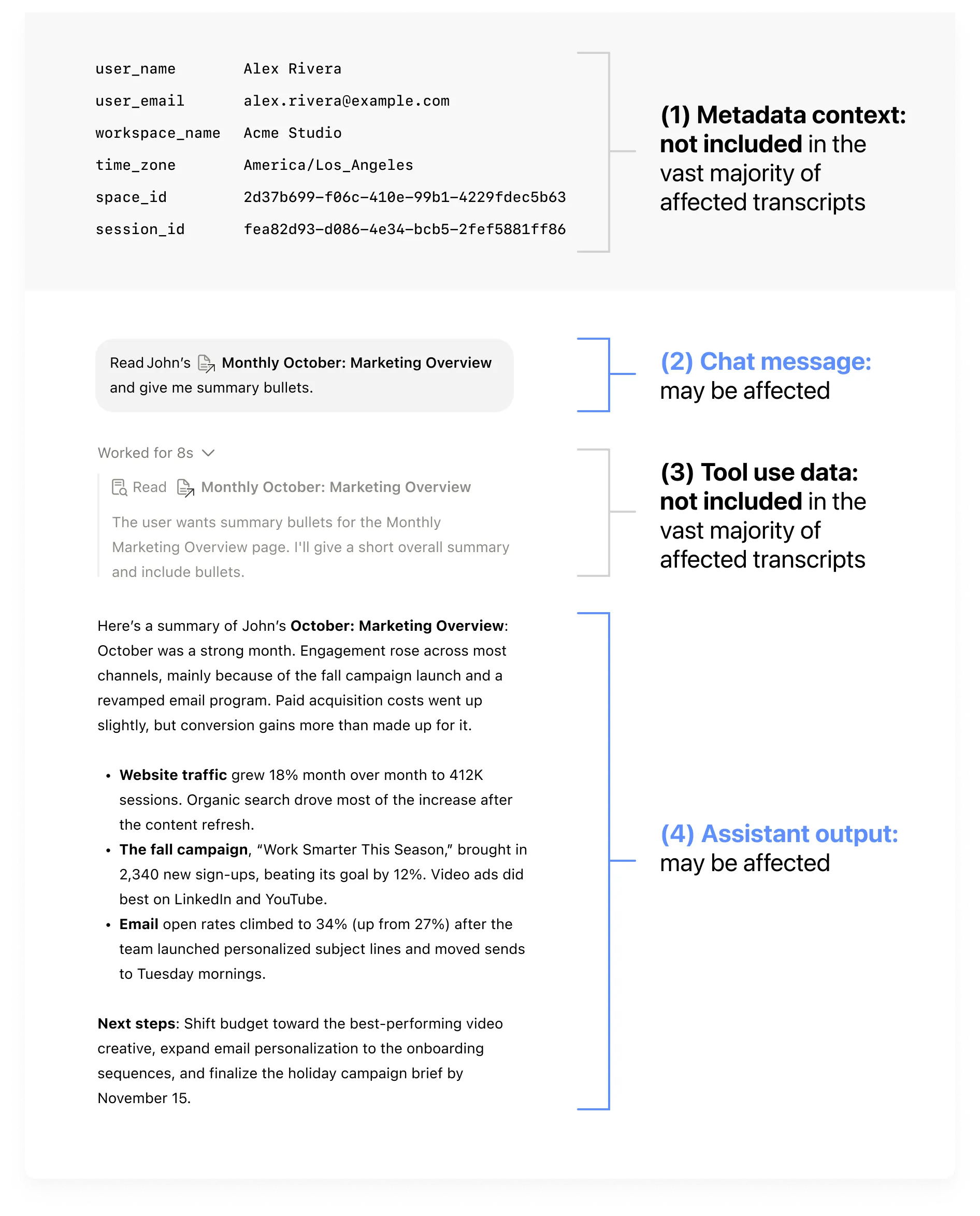
“Unattributable” refers only to the metadata context (1) that is injected into the conversation automatically, such as your name, email, or workspace details. The vast majority of affected transcripts did not contain this metadata that automatically ties a thread to a user and workspace.
The affected data included the full text of the user’s chat messages (2), including any names, email addresses, API tokens, or other sensitive information typed by the user. It may also have included text selected on the current page, but not the rest of the page’s content, nor attachments in the chat such as spreadsheets or images.
The assistant’s tool use (3) was not part of the affected data for the vast majority of affected transcripts. Tool use refers to actions Notion AI might take to complete a task, like searching the web, reading a page, or querying a database. For example, if Notion AI searched your workspace, neither the search query nor the results are in the affected data unless cited by the AI assistant output (4).
The full text of AI assistant output (4) was included in the affected data. This could potentially include fragments of referenced pages or artifacts. For example, if the assistant read a page or database to answer your question, text it used from that source may appear in the output.
Data from AI Meeting Notes, including audio, transcripts, or summaries, was not affected unless it was typed in the user’s chat message (2), or referenced by the AI assistant in the full text output (4).
What's in each chat depends on how you used Notion AI, so the affected data will look different for every workspace. To protect yourself, we recommend reviewing it for anything that could be traced back to you or your organization.
Start with credentials like API keys and passwords, since those are the most urgent to rotate if you find them. Then look for personal details that could identify you, such as names, email addresses, or physical addresses.
How to analyze, understand and respond to this data
Workspace owners and affected members can download the affected data from the workspace sidebar → ? → Security incident review.
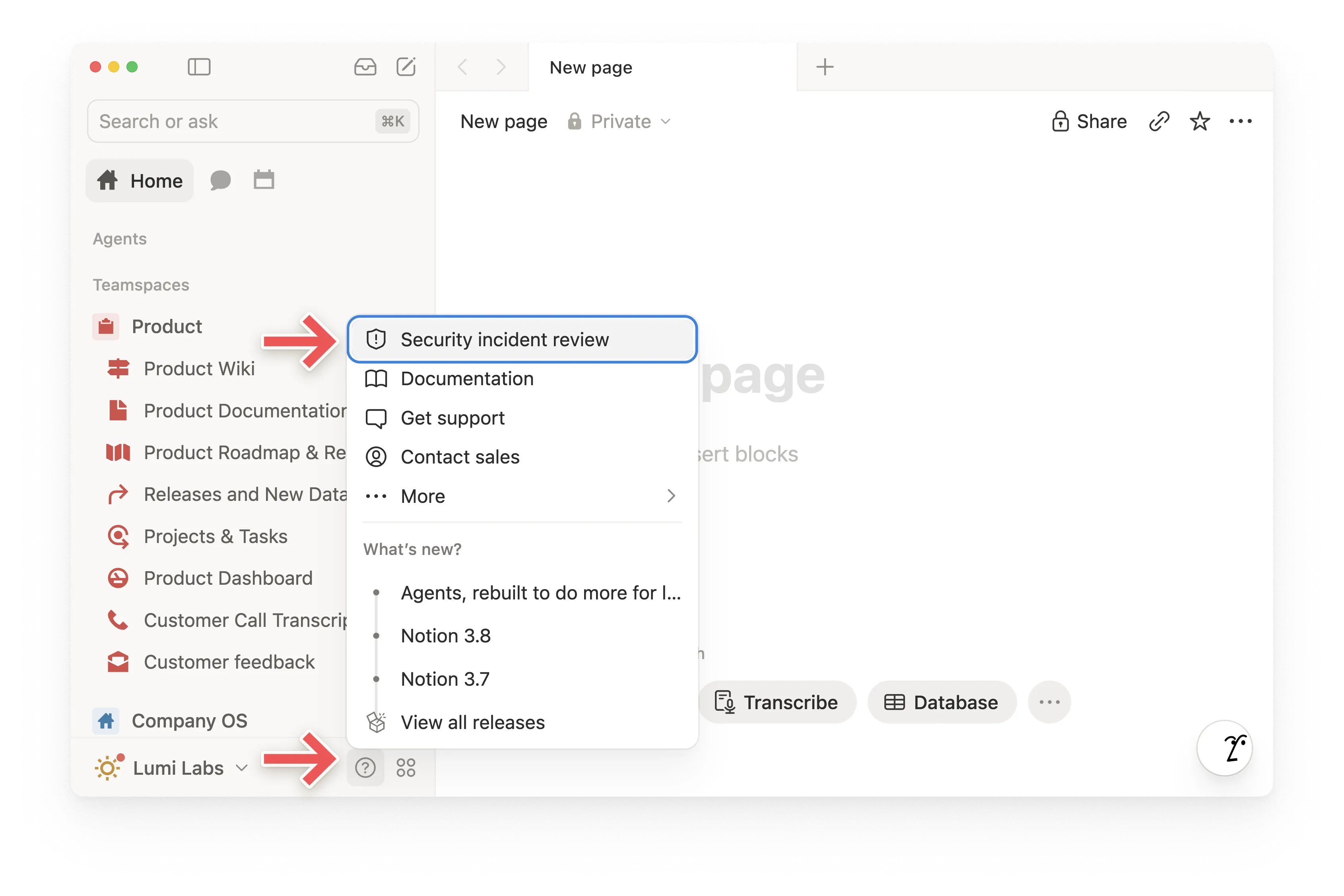
Here is some guidance on what to look for and how to analyze this content.
As always, we strongly recommend that impacted users do their own analysis on their affected data. This data might be sensitive, so we recommend looping in your security team and following your organization’s security procedures. This might mean storing this data in a restricted location with limited access, and deleting local copies when finished.
Knowing which file you’re looking at
Notion provides multiple datasets: affected content, affected content with annotations provided by Notion to help with your analysis, and affected members. The annotations provided are not an indication of what was exposed. All fields prefixed with __ were added by Notion after the incident to aid in your analysis and are not part of the affected data.
affected_content.csvcontains the affected data as it was accessed. This includes the message content,text, and its author,message_role, which is either the user or the AI model. This might include personal information and private context.To reconstruct conversations and people
To read a conversation in context, group rows by
__metadata_record_idor__metadata_thread_id, then sort them by__metadata_content_ordinal.To identify whose data a row belongs to, match
__metadata_user_idto the user IDs in the affected members file. It may help to start with members who have the most affected rows, including deactivated members.__metadata_source_dateshows when the data was sent to our vendor, Fireworks AI, typically within a day of the Notion AI interaction. This only includes data impacted by the incident.You can share access with affected members using
Copy link. They have the most context on what they shared.
Owners in Enterprise and Business workspaces with a verified domain will be able to download annotated data for the entire workspace.
affected_content_annotated.csvcontains the same data, in the same order, plus extra columns we added to help with bulk analysis. Columns that start with__metadataor__analysiswere not exposed in the incident.The
__analysisfields flag potentially sensitive information, like credentials, so you know where to start.In the annotated CSV, filter
__analysis_secret_categoriesfor any value other than[]. These rows may contain passwords, API keys, or other credentials — rotate those right away.__analysis_pii_categoriesflags categories likeperson,email,phone,address, andaccount_number.__analysis_findingslists each detection with start and end positions, so you can pinpoint the flagged span within the message.Note: treat automated flags in the
__analysiscolumn as a starting point. Review the text content for sensitive terms specific to your organization.
Download affected membersgives you the names, emails, membership status, user IDs, and number of affected rows for each affected member.
What to do next to protect yourself
As a precaution, we recommend treating the affected data as if it were exposed. Here's what to do, starting with the most urgent.
Rotate any exposed credentials right away. If you find passwords, API keys, tokens, or other credentials in the data, rotate them immediately and check what they could access. Start with the highest-risk ones, like credentials with admin or production access, or access to customer data.
Watch for phishing. Names, email addresses, and other details from chats could be used in targeted phishing attempts. Be cautious of unexpected messages that mention this incident or ask for credentials.
Check for unusual activity. Review audit and access logs for the affected services. Look for attempts to use exposed credentials or unexpected traffic spikes.
Keep secrets out of chats and docs going forward. Store credentials in a dedicated secrets manager and rotate them on a regular schedule.
We know this is stressful, and we understand the urgency. If you have any questions, please reach out to your Notion account representative or the Notion support team. We'll do our very best to help you get unblocked.
This section explains additional tools owners can use to manage and analyze impacted data for their organization.
View affected content for multiple workspaces in your organization
Organization owners can download affected content for multiple workspaces, grouped by region, under Org console → Data & Compliance → Security incident review → Affected content in workspaces you have access to.
Under Your organization's affected content, choose Download all workspaces (Region) for the specific region where your data is stored.
Downloads include all verified workspaces the organization owner has access to.
Assign Security incident reviewers
Organization owners can create a custom admin role to give additional users permission to review an organization’s affected content. Go to Org console → People → Manage admin roles. Choose Create role → turn on Security incident review. Scope the permission to be organization-wide or only for selected workspaces, then assign members.
Users with this permission can review and download affected content for allowed workspaces without being a workspace owner in each one.
Remove access to affected content
Workspace owners have the option to remove the workspace’s access to affected content in workspace sidebar → ? → Security incident review → Remove access to affected content.
This removes the affected content CSVs for everyone in the workspace, including workspace owners and members who haven't downloaded their own conversations. Download and review the files you need first. This does not delete any data, and it does not change Notion AI chat history or data retention.
FAQs
What is Fireworks and how did Notion use them?
What is Fireworks and how did Notion use them?
Fireworks AI is one of the most used global AI infrastructure platforms powering tens of thousands of customers and used by hundreds of thousands of developers.
As of November 3rd, we have disconnected our systems from Fireworks, and stopped sending all data and traffic to Fireworks. On November 4th, all data was deleted from Fireworks system.
We previously used Fireworks for classification jobs to help customers understand their own AI usage through a feature in Notion called Insights, and as a general inference provider to serve open-weight models inside our product. The Insights feature has been disabled as we investigate this incident, and we are no longer serving open-weight models through Fireworks.
How did Notion use Fireworks with the Learning and Early Access Program (LEAP)?
How did Notion use Fireworks with the Learning and Early Access Program (LEAP)?
Customers in the Learning and Early Access Program (LEAP) volunteer their data to help Notion test new AI technology. In the past, we used this volunteered data to experiment with training task-specific models on Fireworks.
What do chat transcripts include?
What do chat transcripts include?
Any input to or output from the model that was written to the chat is included in that chat transcript. We highly encourage you to look at and analyze the data yourself to understand the impact.
Data from AI Meeting Notes, including audio, transcripts, or summaries, was not affected unless it was used as an input in a chat transcript with Notion AI.
Did the chat transcripts contain any additional metadata that can be attributed back to the user, workspace or company?
Did the chat transcripts contain any additional metadata that can be attributed back to the user, workspace or company?
For the vast majority of impacted workspaces, the chat transcripts sent to Fireworks AI contained only the input or output from the model that was written to the chat. Notion did not add any additional metadata that attributes the chat transcript back to your specific workspace, user, or company.
We recommend that you do a thorough analysis of the affected data as the specific input or output from the model may contain sensitive data. If anyone on your team pasted sensitive information like passwords, API keys, or other credentials into Notion AI during this timeframe, we recommend rotating them right away.
Where can I learn more about Notion’s security practices?
Where can I learn more about Notion’s security practices?
Visit our Security page for an overview of Notion’s security and privacy practices. For more information on security policies, security audit reports, penetration test results, and additional resources, visit the Notion Trust Center.
I have ZDR as part of my Enterprise plan. What does it cover for Notion AI use?
I have ZDR as part of my Enterprise plan. What does it cover for Notion AI use?
Zero data retention (ZDR) is our commitment for our enterprise customers. It applies to the API requests we send to third party model vendors we use to generate responses to Notion AI requests. For those requests, we work with each third party vendor to ensure their API endpoints are ZDR compliant, and therefore have an expectation that they don’t retain any of the request and response data associated with the API request.
Notion also supports product features that require us to store the requests and responses made to those third party models, including features like chat history and Insights. Insights is a workspace tool that gives administrators information about how their workspace members use AI. Our zero data retention commitments are not intended to cover these use cases where we are required to retain the data to deliver the feature.
For the Insights feature, we sent the stored requests and responses from Notion AI use to a third party model provider, Fireworks in this case, to run the analysis that we visualize for the administrator.
We apply our general data minimization practices when providing our services, including the analysis performed for Insights. As part of these data minimization efforts, Fireworks provided us with a contractual commitment to zero data retention for our use of its platform. Unfortunately, during our investigation we learned that data was retained from the Fireworks endpoints that we used.
Looking forward, we are doing an audit of critical vendors — such as inference providers, and data processors — to verify that they abide by data minimization practices, including zero data retention policies.