
Notion ships fast, and a lot of people rely on our learning content to keep up. Our customer education surfaces get roughly 1.4 million visits a month. In a typical month, we also track more than 30 product changes that could affect Notion Academy.
Keeping up used to mean manually tracing each launch across the Academy to see what content it affected. So we built an agent workflow in Notion to do that work for us.
Two Custom Agents investigate product changes and draft updates. Our team reviews the drafts and decides what reaches learners. MCP connects the workflow to Parta.io, our e-learning platform, so approved content can move into final QA without another manual hand-off.
The system gives our team hours back each week. More importantly, it helps us find stale content earlier and maintain quality as the product changes.
Why content drift is harder than find-and-replace
Notion Academy is organized around what people are trying to accomplish, not around product features. A course follows a goal, and any given lesson might use several features to get there.
That’s good for learning, but it means a product change rarely lives in one place. The same change can show up differently across lessons, and the places that need attention aren’t always obvious. We call the gap between a changing product and the content that explains it content drift.
Multiply that across everything shipping in a month, and reviewing it all becomes a job in itself.
How we built our content-maintenance system
We built this system to enable us to keep pace as the product changes. It doesn’t replace the launch planning we already do with product teams. For bigger releases, we still get involved early and prepare updates ahead of launch. This system extends that coverage to smaller, incremental product updates.
The setup runs on three building blocks:
Two databases: An Academy library maps the content we maintain. A maintenance-tasks database tracks the work created by each product change.
Two Custom Agents: One finds and scopes possible content drift. The other drafts the approved update and stages it for publishing.
One MCP connection: MCP gives the agents controlled access to Parta.io so they can inspect live lessons and stage approved changes.
Together these turn content maintenance into a loop that requires only editorial oversight. That leaves more room for thoughtful work, like experimenting with new learning formats and going deeper on our learning strategy.
How a task moves through the system
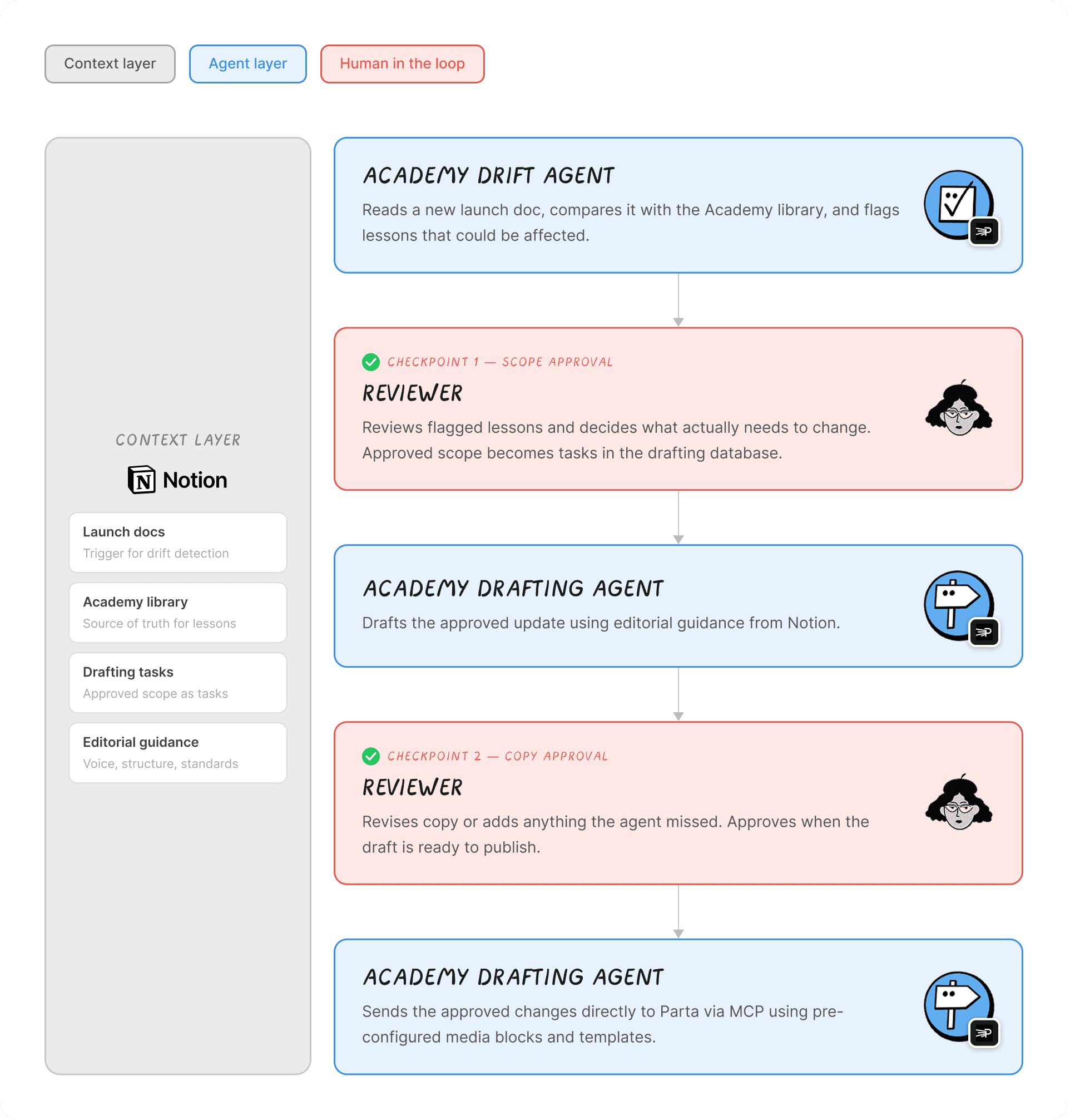
The Academy Drift Agent finds what might need updating: It reads a new launch doc and compares it with our Academy library. It flags lessons that could be affected and explains why each one was surfaced. A reviewer then decides what actually needs to change. Then, those findings become tasks in our second database.
The Academy Drafting Agent drafts the update: Once the scope is approved, the second agent creates a draft using our editorial guidance. A reviewer can revise the copy or add anything the agent missed.
The second agent moves the approved update into Parta.io: Once the draft is approved, the same agent sends the changes directly to Parta.io through MCP. It uses the media blocks and templates we’ve already set up, so the formatting carries over.
We designed this process with human review built in, with two checkpoints where mistakes would be hardest to undo: once before we approve the scope and again before the final copy moves into Parta.io.
Uh-oh! It looks like your ad blocker is preventing the video from playing.
Please watch it on YouTube
How Notion becomes the context and collaboration layer
For a system like this to work, the agents need the same context the team uses to make decisions. For us, that context already lives in Notion. It’s where we collaborate on launches and where we track our work. MCP brings in context from Parta.io that our agents can use.
We don’t have to recreate that context for the agents. They can investigate a change against the same source material our team uses, then bring back a recommendation for review. That removes most of the manual cross-tool comparison it used to take to find what needs attention.
A closer look at the databases behind the workflow
The system is built around two databases in Notion. One maps the content we maintain and the other tracks the work that comes out of each product change.
Academy library
The Academy library is the map of our curriculum. It inventories each course and lesson along with the metadata the agents use to understand what the content covers and where it sits.
When a new launch comes in, the agents use this database to narrow down which lessons might be affected before looking more closely at the content itself. We use product tags and AI autofill to speed up the tagging process.
Maintenance tasks
The tasks database is where potential fixes turn into assigned work. When an agent finds content that might need attention, it creates a task with a recommended fix.
From there, the task moves through review, drafting, approval, and publishing. It also gives the team one place to see task status, ownership, and version history.
Meet the Custom Agents behind the workflow
Once the databases were in place, we built two Custom Agents. One investigates a launch and figures out what needs to change. The other drafts the update using our style guide, then stages the approved content in Parta.io.
The Academy Drift Agent
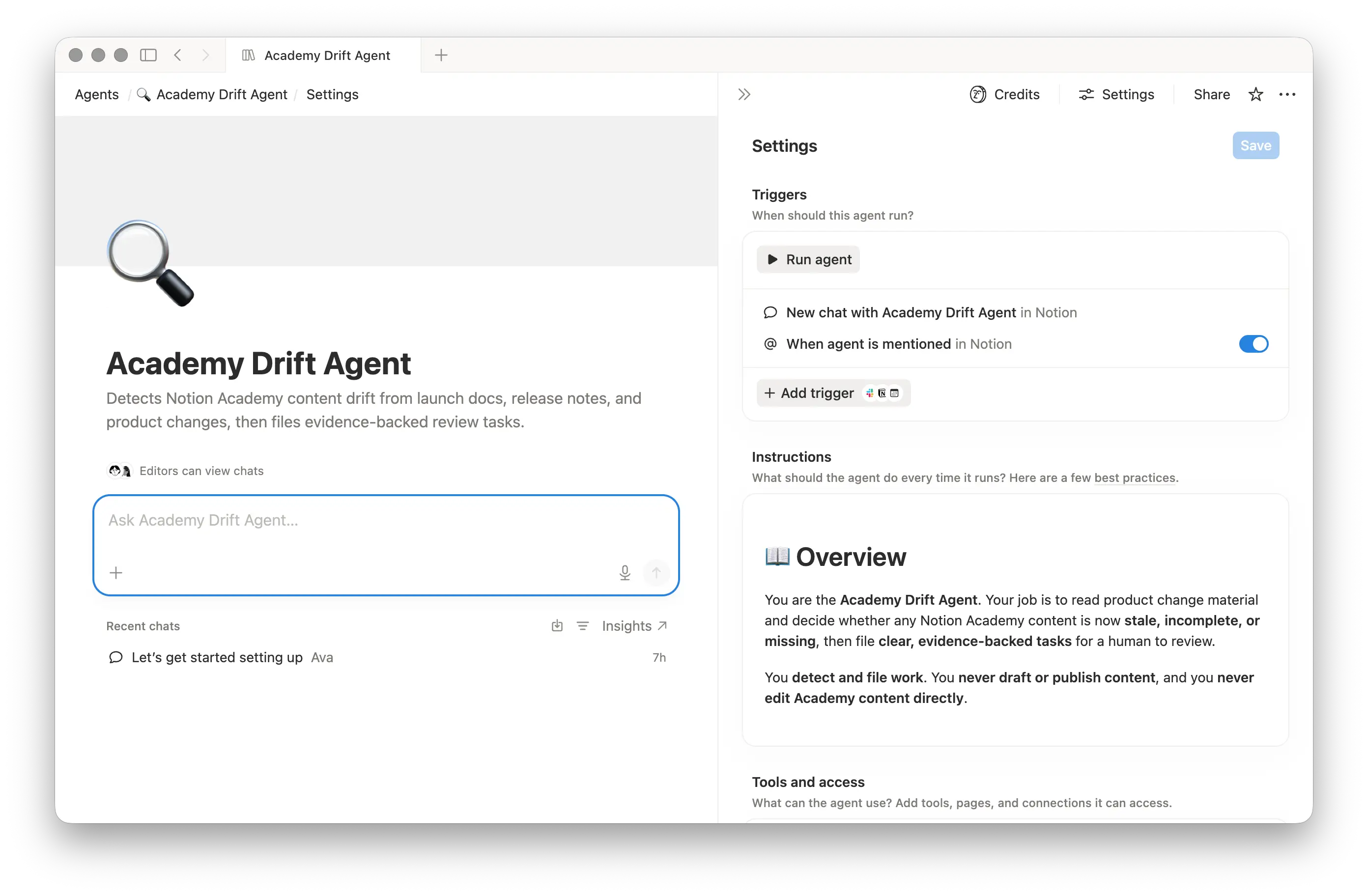
The first agent starts with a new launch doc. It works out what changed and surfaces the lessons that might be affected. For each match, it creates a task with a recommendation and the evidence behind it. A reviewer then decides whether there’s actually an update worth making.
Academy Drafting Agent
Once the scope is approved, the second agent takes over. It reads the launch context alongside the existing lesson and drafts the change using our editorial guidance. The draft comes back to the team, and we revise the language, correct the interpretation, or add context before approving.
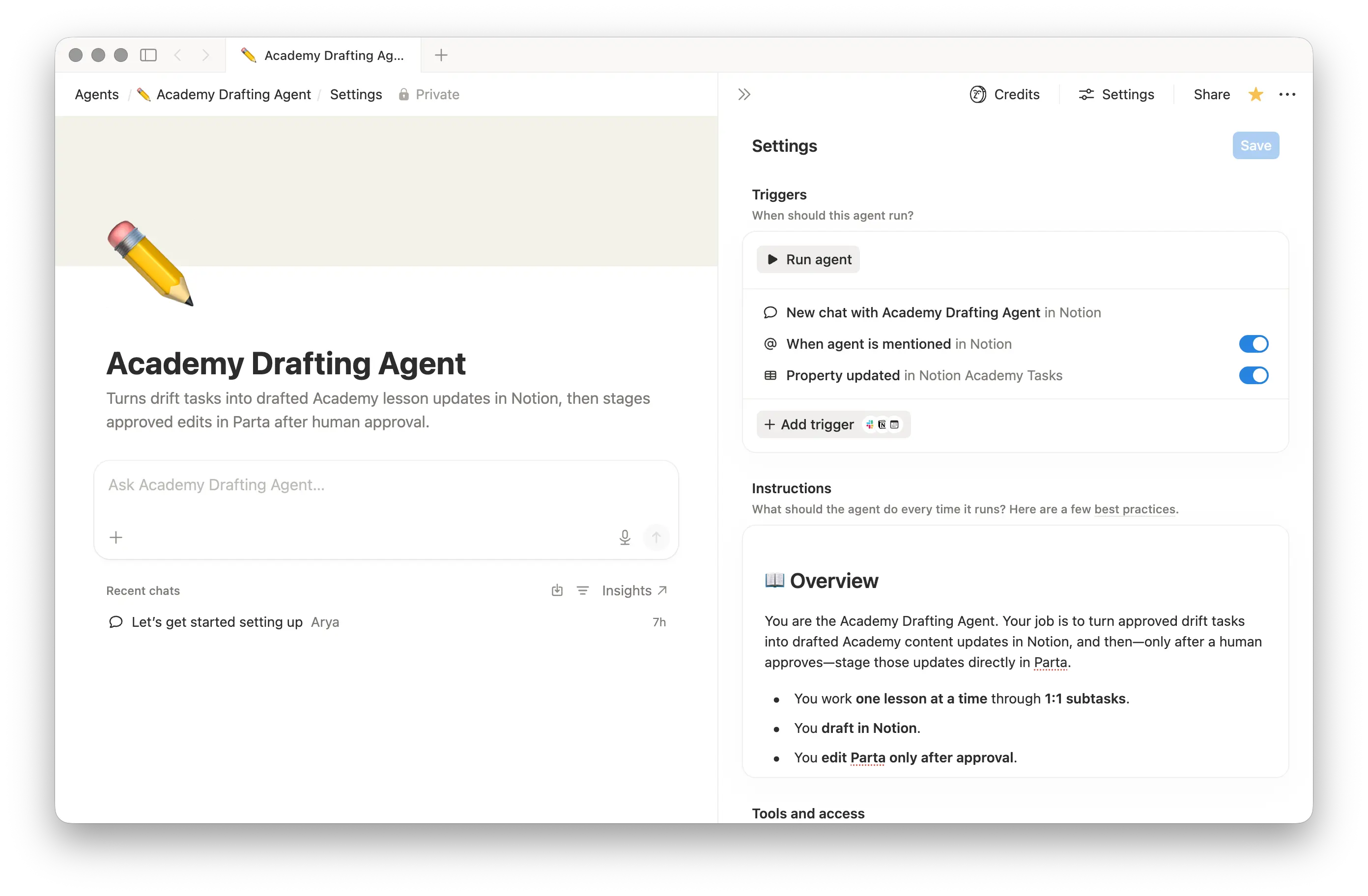
Parta.io MCP
The Academy Drafting Agent uses MCP to move the approved update from Notion into Parta.io for final quality checks and publishing. Learn how to connect an MCP to a Custom Agent →
In Closing
If you’re building something inspired by this, your databases and agents don’t need to match ours exactly. We recommend a few basic principles:
Keep each Custom Agent focused on a single task.
Keep each database focused on one type of content.
Content maintenance is no longer something we scramble to keep up with for every launch. It’s a system that gets better the more we use it. Every review decision gives us something to fold back into the agents, so fewer cases need our judgment over time. That gives our team more time to focus on helping customers learn and get more from Notion.